
Gemini Nano Banana, an AI image editing tool introduced by Google on the Gemini app, has swiftly gained popularity. It quickly became a social media trend. Reports indicate that the Gemini app gained over 10 million downloads after Nano Banana was released. The AI studio allows users to swiftly edit and generate images. Data shows that more than 200 million images have been created or modified using this tool. Users around the globe are experimenting with creative prompts, resulting in a wave of viral trends. Several Gemini Nano Banana prompts are delivering impressive results. Here are the top 6 viral prompts to try:
Nano Banana prompt 1: Action figure
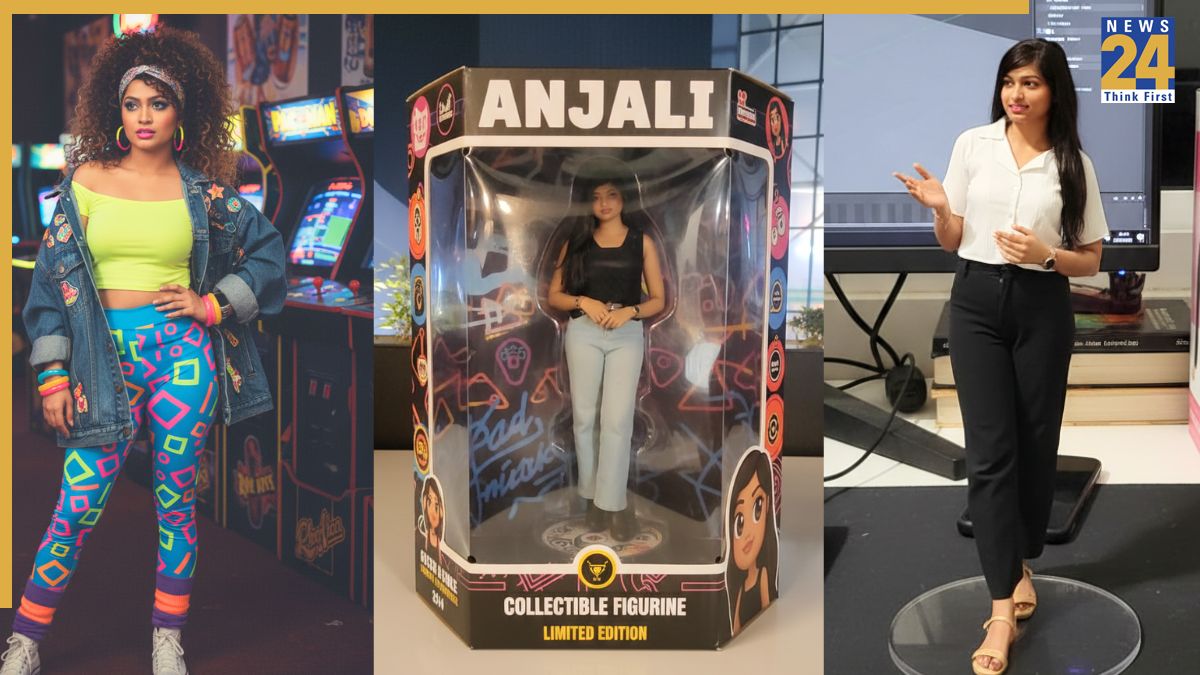
Upload your photo and transform yourself into a collectable figurine inside a toy box, complete with graphics, packaging, and a store-shelf appearance.
Prompt: “Take this image of me and make me a collectible figurine inside a toy box. The box should feature a clear plastic window, bold graphics, and my name on the packaging. Style the figurine in a fun, toy-like way, but keep my likeness recognizable.”
Nano Banana prompt 2: Visit iconic landmarks
The Gemini Nano Banana tool lets you place yourself in front of iconic landmarks such as the Taj Mahal, Eiffel Tower, and Hollywood Sign.
Prompt: “Take this photo of me and put me sitting on top of the Hollywood Sign, waving at the city below. Ensure the image looks realistic with appropriate lighting, shadows, and perspective.”
Nano Banana viral prompt 3: Appear in a TV show
Gemini can integrate you as a character within popular TV shows. To see yourself in Seinfeld, use this prompt:
Prompt: “Create a realistic image of me sitting with Jerry, Elaine, George, and Kramer in Jerry’s apartment from the TV show Seinfeld. Place me on the couch, laughing with the group, in the show’s 1990s style.”
Nano Banana viral prompt 4: Visit a different decade
This trend allows users to step into the past, appearing as a 1990s sitcom character or a 1970s disco dancer. The AI will adjust your clothing, hairstyle, and background to match the vintage look.
Prompt: “Transform me into a 1980s character, complete with neon clothing, big hair, and an arcade in the background. Make the image look like a real portrait from that decade, with accurate fashion and colors.”
Nano Banana viral prompt 5: Classic artwork
Be included in famous paintings. Whether you want to be in Van Gogh’s Starry Night or standing beside the Mona Lisa, Gemini Nano Banana AI studio will do it.
Prompt: “Place me inside Vincent van Gogh’s Starry Night. Paint me using the same swirling brushstroke style, standing under the starry sky so I blend naturally into the scene.”
6. Nano Banana prompt 6: 3D figurine
The realistic 3D figurine trend is hugely popular, and people everywhere want to participate. This new AI model generates commercialized figurines in a real environment and in a realistic style. Upload pictures of objects, people, and pets, and get a 3D figurine and more for free. Here is a guide to creating your Nano Banana 3D figurine for free:
Prompt: “Develop a 1/7 scale commercial figurine based on the characters in the picture, in a realistic style within a real environment. The figurine is placed on a computer desk, with a round transparent acrylic base, with no text on the base. The computer screen is showing a 3D modeling process of this figurine. Next to the screen is a toy packaging box, designed in a style reminiscent of high-quality collectible figures, printed with original artwork. The packaging features two-dimensional flat illustrations.”
Gemini Nano Banana AI Studio: How to generate yours for free
Log into the Gemini 2.5 Flash Image (Nano Banana) portal through a web browser.
Alternatively, access the Gemini app if installed on your iPhone or Android device.
Click or tap on “Try Nano Banana.”
Tap the + sign to add an image.
Now, paste the Nano Banana 3D figurine prompt.
Next, press “Enter,” and the AI model will generate a 3D figurine based on your image. Download and share the image on social media to join the viral trend.